Unityでスプライトのみで作れる湯煙りエフェクトを作りました。
使うのは下記ソースコードと湯煙スプライト
▼2D湯煙り発生コントローラーソースコード(クリック)
using System.Collections;
using System.Collections.Generic;
using UnityEngine;

public class Steam2DMaskEffect : MonoBehaviour
{
    [Header("湯煙設定")]
    [SerializeField] private Sprite[] steamSprites;

    [Header("配置設定")]
    [SerializeField] private GameObject steamPositionParent;
    [SerializeField] private Vector2 positionRandomRange = new Vector2(0.5f, 0.5f);

    [Header("アニメーション設定")]
    [SerializeField] private float fadeSpeed = 1f;
    [SerializeField] private float moveSpeed = 0.5f;
    [SerializeField] private float scaleSpeed = 0.3f;

    [Header("生成設定")]
    [SerializeField] private float minSpawnInterval = 0.3f;
    [SerializeField] private float maxSpawnInterval = 0.8f;
    [SerializeField][Range(0f, 1f)] private float spawnChance = 0.7f;

    private List<SteamInstance> activeSteams = new List<SteamInstance>();
    private Coroutine spawnCoroutine;
    private List<Transform> steamPositions;


    [System.Serializable]
    public class SteamInstance
    {
        public GameObject gameObject;
        public SpriteRenderer renderer;
        public float lifeTime;
        public Vector2 moveDirection;
        public float initialScale;

        public bool IsValid()
        {
            return gameObject != null && renderer != null;
        }
    }

    void Awake()
    {
        // 初期化時にリストが null でないことを確認
        if (activeSteams == null)
        {
            activeSteams = new List<SteamInstance>();
        }

        // steamPositionParentの子オブジェクトを取得
        if (steamPositionParent != null)
        {
            steamPositions = new List<Transform>();
            foreach (Transform child in steamPositionParent.transform)
            {
                steamPositions.Add(child);
            }

            // デバッグ用:取得した子オブジェクトの数を確認
            Debug.Log($"湯煙生成位置を {steamPositions.Count} 個取得しました");
        }
        else
        {
            Debug.LogWarning("steamPositionParent が設定されていません");
            steamPositions = new List<Transform>();
        }
    }

    void OnEnable()
    {
        StartSteamEffect();
    }

    void OnDisable()
    {
        StopSteamEffect();
    }

    void StartSteamEffect()
    {
        // 既存のコルーチンを停止
        if (spawnCoroutine != null)
        {
            StopCoroutine(spawnCoroutine);
        }

        // スプライトチェック
        if (steamSprites == null || steamSprites.Length == 0)
        {
            Debug.LogError("[Steam2DMaskEffect] Steam Sprites array is empty or not assigned!", this);
            return;
        }

        spawnCoroutine = StartCoroutine(SpawnSteamRoutine());
    }

    void StopSteamEffect()
    {
        if (spawnCoroutine != null)
        {
            StopCoroutine(spawnCoroutine);
            spawnCoroutine = null;
        }

        // すべての湯煙を削除
        ClearAllSteam();
    }

    void ClearAllSteam()
    {
        if (activeSteams != null)
        {
            foreach (var steam in activeSteams)
            {
                if (steam != null && steam.gameObject != null)
                {
                    Destroy(steam.gameObject);
                }
            }
            activeSteams.Clear();
        }
    }

    IEnumerator SpawnSteamRoutine()
    {
        yield return null; // 1フレーム待機

        while (gameObject.activeInHierarchy)
        {
            SpawnSteam();
            float waitTime = Random.Range(minSpawnInterval, maxSpawnInterval);
            yield return new WaitForSeconds(waitTime);
        }
    }

    void SpawnSteam()
    {
        // steamPositionsが設定されているかチェック
        if (steamPositions == null || steamPositions.Count == 0)
        {
            // 位置が指定されていない場合は、このオブジェクトの位置を使用
            CreateSteamInstance(transform.position);
        }
        else
        {
            // null チェックを追加
            foreach (Transform spawnPoint in steamPositions)
            {
                if (spawnPoint != null && Random.Range(0f, 1f) <= spawnChance)
                {
                    CreateSteamInstance(spawnPoint.position);
                }
            }
        }
    }

    void CreateSteamInstance(Vector3 basePosition)
    {
        // スプライト配列から有効なスプライトを取得
        if (steamSprites == null || steamSprites.Length == 0) return;

        // null でないスプライトを探す
        List<Sprite> validSprites = new List<Sprite>();
        foreach (var sprite in steamSprites)
        {
            if (sprite != null) validSprites.Add(sprite);
        }

        if (validSprites.Count == 0)
        {
            Debug.LogError("[Steam2DMaskEffect] No valid sprites found in steamSprites array!");
            return;
        }

        // 新しいGameObjectを動的に作成
        GameObject steam = new GameObject("SteamCloud");
        steam.transform.SetParent(transform);

        // ランダムな位置オフセット
        Vector3 randomOffset = new Vector3(
            Random.Range(-positionRandomRange.x, positionRandomRange.x),
            Random.Range(-positionRandomRange.y, positionRandomRange.y),
            0
        );
        steam.transform.position = basePosition + randomOffset;

        // SpriteRendererを追加
        SpriteRenderer renderer = steam.AddComponent<SpriteRenderer>();

        // ランダムにスプライトを選択して設定
        renderer.sprite = validSprites[Random.Range(0, validSprites.Count)];

        // ソートオーダーを設定(手前に表示)
        renderer.sortingOrder = 100 + Random.Range(0, 10);

        // 初期の透明度を設定
        renderer.color = new Color(1f, 1f, 1f, 0f);

        // 初期設定
        SteamInstance instance = new SteamInstance
        {
            gameObject = steam,
            renderer = renderer,
            lifeTime = 0,
            moveDirection = new Vector2(Random.Range(-0.2f, 0.2f), Random.Range(0.3f, 0.6f)),
            initialScale = Random.Range(0.8f, 1.2f)
        };

        steam.transform.localScale = Vector3.one * instance.initialScale * 0.5f;

        if (activeSteams == null)
        {
            activeSteams = new List<SteamInstance>();
        }
        activeSteams.Add(instance);
    }

    void Update()
    {
        if (activeSteams == null) return;

        for (int i = activeSteams.Count - 1; i >= 0; i--)
        {
            if (activeSteams[i] == null || !activeSteams[i].IsValid())
            {
                activeSteams.RemoveAt(i);
                continue;
            }

            UpdateSteamInstance(activeSteams[i]);

            if (activeSteams[i].lifeTime > 3f)
            {
                if (activeSteams[i].gameObject != null)
                {
                    Destroy(activeSteams[i].gameObject);
                }
                activeSteams.RemoveAt(i);
            }
        }
    }

    void UpdateSteamInstance(SteamInstance steam)
    {
        if (steam == null || !steam.IsValid()) return;

        steam.lifeTime += Time.deltaTime;

        // 上昇移動
        steam.gameObject.transform.position += (Vector3)steam.moveDirection * moveSpeed * Time.deltaTime;

        // 横揺れ
        float sway = Mathf.Sin(steam.lifeTime * 2f) * 0.1f;
        steam.gameObject.transform.position += Vector3.right * sway * Time.deltaTime;

        // スケールアニメーション(徐々に大きくなる)
        float scaleProgress = steam.lifeTime / 3f;
        float currentScale = Mathf.Lerp(steam.initialScale * 0.5f, steam.initialScale * 1.5f, scaleProgress);
        steam.gameObject.transform.localScale = Vector3.one * currentScale;

        // フェードアニメーション
        Color color = steam.renderer.color;
        if (steam.lifeTime < 0.5f)
        {
            // フェードイン
            color.a = Mathf.Lerp(0, 0.7f, steam.lifeTime * 2f);
        }
        else if (steam.lifeTime > 2f)
        {
            // フェードアウト
            color.a = Mathf.Lerp(0.7f, 0, (steam.lifeTime - 2f));
        }
        else
        {
            // 中間で揺らぎ
            color.a = 0.7f + Mathf.Sin(steam.lifeTime * 3f) * 0.1f;
        }
        steam.renderer.color = color;
    }

    void OnDestroy()
    {
        ClearAllSteam();
    }

#if UNITY_EDITOR
    void OnDrawGizmosSelected()
    {
        if (!Application.isPlaying)
        {
            Gizmos.color = Color.cyan;

            if (steamPositions != null)
            {
                foreach (Transform t in steamPositions)
                {
                    if (t != null)
                    {
                        // 生成位置を表示
                        Gizmos.DrawWireSphere(t.position, 0.1f);

                        // ランダム範囲を表示
                        Gizmos.color = new Color(0, 1, 1, 0.3f);
                        Gizmos.DrawWireCube(t.position, new Vector3(positionRandomRange.x * 2, positionRandomRange.y * 2, 0));
                    }
                }
            }
        }
    }
#endif
}-
スプライト(見えないので背景を黒くしています)

実装方法
①空のオブジェクトを作成して、上記のソースコードをアタッチ。名前は「SteamManager」にしています
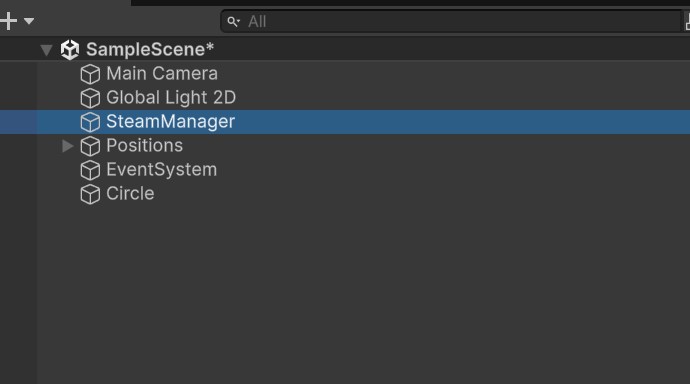
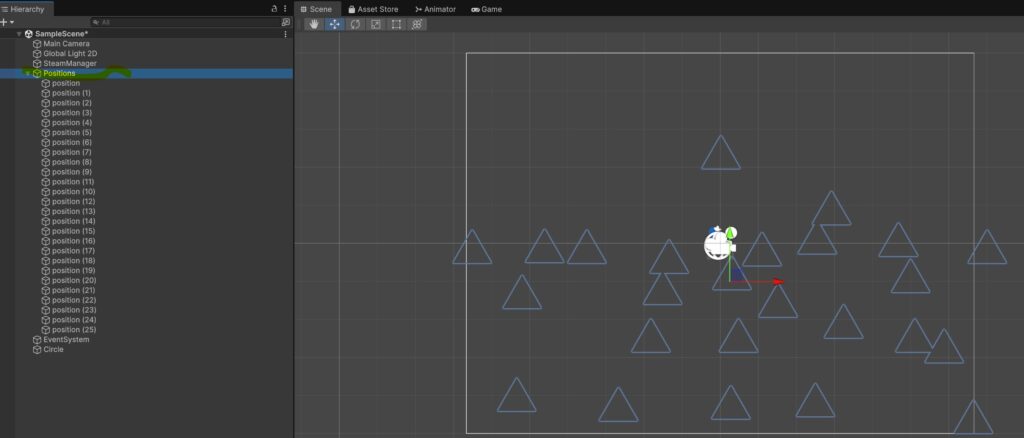
②湯煙り発生位置をまとめる親オブジェクト(Positions)作ります。そのオブジェクトの子オブジェクトを作成し、湯煙を発生させたいポイントに配置します。子オブジェクトは発生させたい箇所に好きなだけ配置します。画面の三角のマークがオブジェクトを配置した位置です。
③スクリプトをアタッチしたオブジェクトのインスペクター上でSteamSpritesに湯煙の画像をセットし、SteamPositionParentに先ほどの湯煙発生位置の親オブジェクトをセットします。あとはアニメーション設定や生成設定の値を変更すると湯煙の表示状況が変化します。
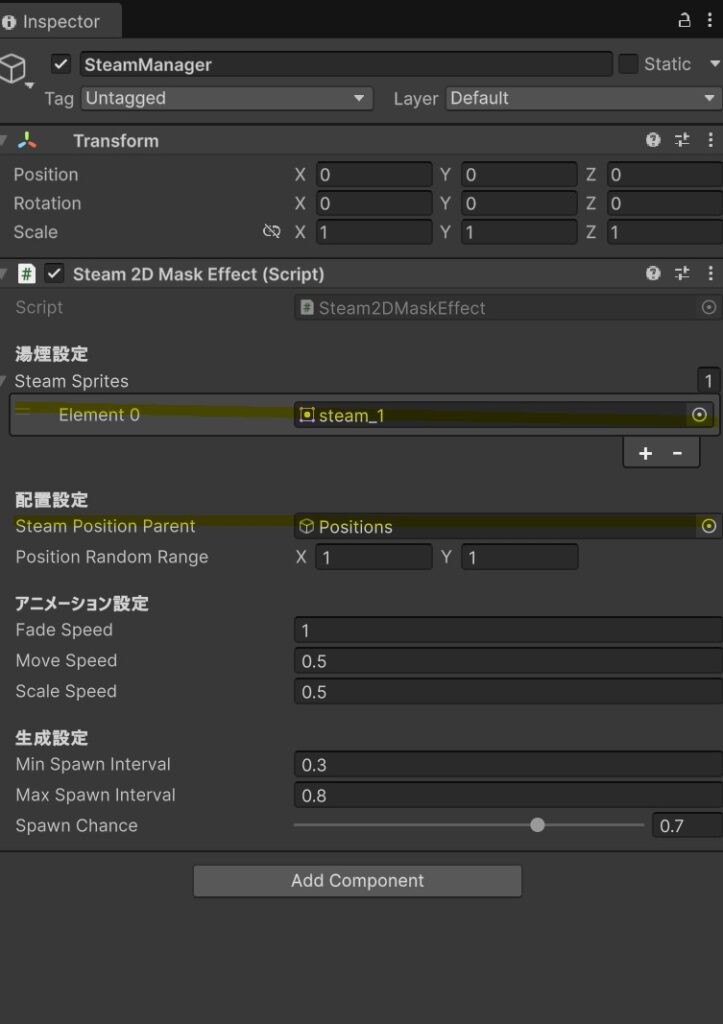
これで設定完了です。
実行するとこのようになります
おまけ
湯煙が合う画像を用意しました。全然見えないので大丈夫ですね。

管理者です
–